


The 10 best budgeting apps in 2026

Updated 16 July 2026
The best budgeting apps in 2026 are Finary, Bankin', Linxo and Tricount for aggregating French bank accounts, and YNAB for a strict budgeting method. This comparison sets out their features, pricing and limits so you can pick the tool that suits your situation.

- Emma, Wallet and Spendee round out the range with targeted subscription tracking or detailed spending charts.
- Most apps offer a free tier; advanced features (unlimited syncing, automatic categorisation) usually require a paid subscription.
- The choice depends above all on your use case: personal tracking, family budgeting or splitting expenses between friends do not call for the same tools.
- Not all of them work with French banks: check that compatibility before choosing, particularly for foreign apps such as YNAB.
How do you choose a budgeting app?
Before deciding, check a few criteria: whether the free tier is genuinely usable, compatibility with your French banks, how data gets in (automatic syncing or manual entry), the level of data security, the platforms supported (iOS, Android, desktop) and the subscription price for advanced features. Your use case matters too: day-to-day personal tracking, family budgeting or splitting expenses between friends do not call for the same tools.
Why choose Finary to manage your budget?
Finary's Cashflow feature gives you a complete, precise view of your finances, with advanced tools for clear and effective budgeting.
Why it is a good app:
- Automated budget tracking: Finary aggregates all your bank accounts, categorises your spending with AI and calculates your savings rate in real time, with a monthly, quarterly or annual view.
- Custom budgets and goals: set budgets by category and goals (holidays, a major purchase, savings), then track your progress day to day.
- A complete view of your money: beyond budgeting, Finary centralises your entire net worth (accounts, savings products, PEA, life insurance, property, cryptocurrencies through its authorised CASP service (Crypto-Asset Service Provider, MiCA regime)) so you can connect your spending to your investments.
- Free to start and secure: the app is free to use and protects your data with bank-grade encryption.

Why you should think twice:
It needs active involvement: to get the most out of the app, you need to engage with it regularly, tracking and reviewing your finances.
| Finary | App Store | Play Store |
|---|---|---|
| Rating | 4.7 | 4.6 |
| Download link | Download on the App Store | Get it on Google Play |
How much does it cost?
Finary offers a free tier and paid subscriptions, all with a free trial:
- Finary (free): account aggregation and net worth tracking, to get started at no cost.
- Finary Lite: €54.99 per year, unlimited syncing, budgeting and the fee scanner.
- Finary Plus: €149.99 per year, everything in Lite plus diversification analysis, monthly reports and priority support.
- Finary Pro: €349.99 per year, for managing personal and business finances together (holding mode, business accounts).
Why choose Bankin' to manage your budget?
Bankin' is a budgeting app built to help users plan their financial decisions ahead rather than simply track past transactions. It takes a proactive approach to budgeting, encouraging users to plan carefully how every euro earned gets used.
Why it is a good app:
As soon as your salary lands, Bankin' lets you split your income across categories such as spending, savings and debt. The idea is to become more intentional with your money by making active decisions about how it is used.
With that hands-on approach, Bankin' asks for serious involvement from its users.
Bankin' lets you link your current and savings accounts, as well as your credit cards and loans. The app is available on Android and iOS phones, desktop, iPad and macOS.

Why you should think twice:
It is worth noting that Bankin' requires substantial commitment. It is designed for people who want to be actively involved in managing their money. Its price can also be considered high compared with similar apps.
How much does it cost?
Bankin' offers two paid tiers, Bankin' Plus and Bankin' Pro, suited to different financial needs.
Bankin' Plus, aimed at personal use, is available from €3.33 per month. It offers features such as custom categories for finer analysis of your money flows, the ability to tick off transactions for precise expense tracking, priority customer support for quick answers, matching reimbursements to expenses (health insurance refunds or money fronted for friends and family, for instance), unlimited transaction exports and making transfers straight from the app, although that last feature is limited to certain banks.
Bankin' Pro, designed for business use, starts at €8.33 per month. This tier includes everything in Bankin' Plus and adds business account syncing, for a consolidated, simplified view of a company's cash position.
| Bankin | App Store | Play Store |
|---|---|---|
| Rating | 4.7 | 4.3 |
| Download link | Download on the App Store | Get it on Google Play |
Linxo: strong usability and plenty of features
Linxo is a budgeting and bank account aggregation app that lets you manage personal and business finances in one place. Launched in 2010, it offers an interface for smartphones and tablets, compatible with iOS and Android. It stands out for its ability to bring a person's banking activity together on a single platform, making account management and budgeting easier.
Why it is a good app:
- Bank account aggregation: Linxo lets you manage transactions from several accounts, personal or business, centralised in one interface, which makes handling your finances easier.
- Expense tracking and budgeting: the app categorises spending automatically, offers detailed charts for better financial analysis and lets you add custom notes to expenses. It also provides a forecast budget over more than 30 days, available only on the Premium tier.
- Data security: Linxo provides high-level security for banking data, with encrypted servers and advanced encryption to protect users' personal information.
- Customisation and ease of use: the app offers considerable freedom to customise and is recognised for its ergonomic, easy-to-use interface.
- Comprehensive features: Linxo offers a variety of features, such as making bank transfers straight from the app, customisable real-time notifications, and constantly updated balances across accounts.

Why you should think twice:
- Syncing and duplicate issues: some users have reported slow syncing and duplicated transactions, although those problems seem to have improved recently.
- Limits in the forecasting: the app's forecasting may not always match reality, with missing automatic reconciliations and cash-flow projections that are sometimes off.
- Lack of development and some features: a few users regret the app's limited development and the absence of certain features, such as splitting expenses or creating additional categories for more advanced project management.
- Connection problems with some banks: users have reported difficulties connecting to certain banks, requiring frequent reconnections.
- Limited technical support: some users have expressed frustration with technical support, finding it unresponsive on persistent technical issues.
How much does it cost?
- Free and Premium tiers: Linxo offers a free tier and a premium one. The monthly Premium subscription is €4.
| Linxo | App Store | Play Store |
|---|---|---|
| Rating | 4.4 | 4.3 |
| Download link | Download on the App Store | Get it on Google Play |
Why choose Tricount for group expenses?
Tricount positions itself as a practical tool for groups of friends or families on holiday. The app deals effectively with shared budgeting, letting each user enter and itemise their expenses. Whether for a trip or a special occasion, Tricount simplifies tracking shared expenses.
Why it is a good app:
- Easy to use and access: Tricount stands out for its intuitive interface and ease of use. The app allows collaborative expense management, with each participant able to add their own expenses.
- Versatile features: it offers various options for splitting expenses, including the ability to divide costs unequally and to categorise them.
- Multi-currency support: Tricount is ideal for international trips because it supports several currencies and converts automatically.
- Offline availability: Tricount can be used offline, which is particularly useful where internet access is limited.
- PayPal integration: the app integrates with PayPal to make reimbursements between users easier.

Why you should think twice:
- No direct transfer feature: Tricount does not let you make transfers straight from the app, which some users may see as a limitation.
- Basic interface: Tricount's interface can look too plain for those after a visually appealing app.
- Free tier limits: while the basic version is free, some advanced features, such as exporting data and detailed statistics, are only available in the premium tier.
How much does it cost?
- Tricount is free, with discreet, non-intrusive ads.
| Tricount | App Store | Play Store |
|---|---|---|
| Rating | 4.8 | 4.7 |
| Download link | Download on the App Store | Get it on Google Play |
YNAB: budgeting on macOS and Windows
YNAB, short for You Need A Budget, offers a robust budgeting tool built on the zero-based budgeting method. Users assign every dollar to specific categories such as day-to-day spending, savings or paying down debt, making financial planning proactive and intentional. The app is aimed at people who want a hands-on approach to their personal finances, and includes educational resources to better understand the principles of budgeting and money management.
Why it is a good app:
- Zero-based budgeting method: YNAB uses this approach to allocate every euro to specific spending categories, which helps prevent overspending.
- Ease of use: suits beginners and advanced budgeters alike, and provides tools to track and monitor financial progress.
- Goal setting: lets you define short- and long-term financial goals, helping users save and plan effectively.
- Analysis and reporting: offers reports and charts to track spending and net worth, giving a clear overall picture of your financial situation.
- Bank syncing: YNAB syncs with more than 12,000 banks, giving an in-depth view of personal finances.

Why you should think twice:
- Language and geographic limits: the app is available in English only and syncs only partially with French banks, with coverage more limited than dedicated French aggregators.
- Cost: YNAB is one of the most expensive budgeting apps on the market, at $14.99 monthly or $109 annually ($9.08/month).
- Learning curve: it takes some time to get fully to grips with its features.
- Possible bugs: some users have reported bugs in the app, and there is no phone support available.
How much does it cost?
- Monthly subscription: $14.99 per month.
- Annual subscription: $109 per year, or $9.08 per month (around $70 saved compared with the monthly plan).
- Free trial: 34 days, no card required.
| YNAB | App Store | Play Store |
|---|---|---|
| Rating | 4.8 | 4.6 |
| Download link | Download on the App Store | Get it on Google Play |
Money Manager: straightforward budget tracking
Money Manager stands out for enabling intuitive personal finance management through an interface that makes entering income and expenses easy. The app offers real-time budget tracking through reports updated daily, weekly and monthly, so you can keep a constant eye on your transactions.
Why it is a good app:
- Complete personal finance management: offers a wide range of features, such as managing several accounts, tracking expenses and income, and budget planning.
- Intuitive interface and detailed charts: makes it easy to visualise spending and financial trends through charts and reports, making budgeting more accessible.
- Advanced features: includes double-entry accounting, credit and debit card management, and automatic scheduling of money transfers.
- Recurring transactions and payment profiles: lets you set up recurring expenses and create payment profiles for frequent ones.
- Backup and restore: offers options to back up and restore data via email, iTunes and iCloud.
- Multi-currency support: suited to those managing finances in several currencies.

Why you should think twice:
- Initial setup can be complex: some users found the app's initial setup less straightforward than that of other budgeting apps.
- Limits in categorising transactions: the absence of an option to split a single transaction across several categories or subcategories can be a drawback for some users.
- Paid subscription for extra features: while the basic app is free, a monthly or annual subscription is needed for full functionality, notably data syncing.
How much does it cost?
- Monthly subscription: US$2.49 per month.
- Annual subscription: US$19.99 per year.
- Basic download: free, with in-app purchases for additional features.
| Money Manager | App Store | Play Store |
|---|---|---|
| Rating | 4.7 | 4.6 |
| Download link | Download on the App Store | Get it on Google Play |
Wallet: detailed reports and charts on your spending
Wallet by BudgetBakers is an all-round budgeting app that stands out for its attractive interface and a complete set of features, including goal management and group sharing. Available on Android, iOS and through a web interface, Wallet offers both a free tier and a premium one for more in-depth financial management.
Why it is a good app:
- Custom budgets and goals: lets you plan custom budgets and track financial goals with notifications and forecasts based on your spending habits.
- Group sharing: offers a group sharing option, allowing collaborative management of finances with family and friends.
- Bank syncing: compatible with more than 3,500 banks worldwide, allowing automatic transaction tracking and easier money management.
- Data import: lets you import financial data if you would rather not sync your bank accounts automatically.
- Financial reports and useful extras: includes detailed financial reports, shopping lists, and receipt archiving for complete personal finance management.

Why you should think twice:
- Limited features in the free tier: the free version restricts you to managing finances manually, which can be time-consuming.
- Cost of the premium tier: while the basic version is free, the premium one, which adds features such as bank syncing and multi-user sharing, is considered expensive.
- iOS and web limitations: some Wallet features are not available on the iOS and web versions of the app.
How much does it cost?
Free tier: available with the basic features (statistics, manual transaction entry, widgets), limited to 3 accounts.
Wallet Premium: unlimited accounts, bank syncing, automatic categorisation, Apple Pay integration, tracking of shares, ETFs and crypto, and no ads.
- Monthly subscription: €5.99/month.
- Annual subscription: €29.99/year, or €2.50/month (the most popular option).
- One-off lifetime payment: €49.99.
| Wallet | App Store | Play Store |
|---|---|---|
| Rating | 4.6 | 4.4 |
| Download link | Download on the App Store | Get it on Google Play |
Emma: budgeting and subscription tracking in one
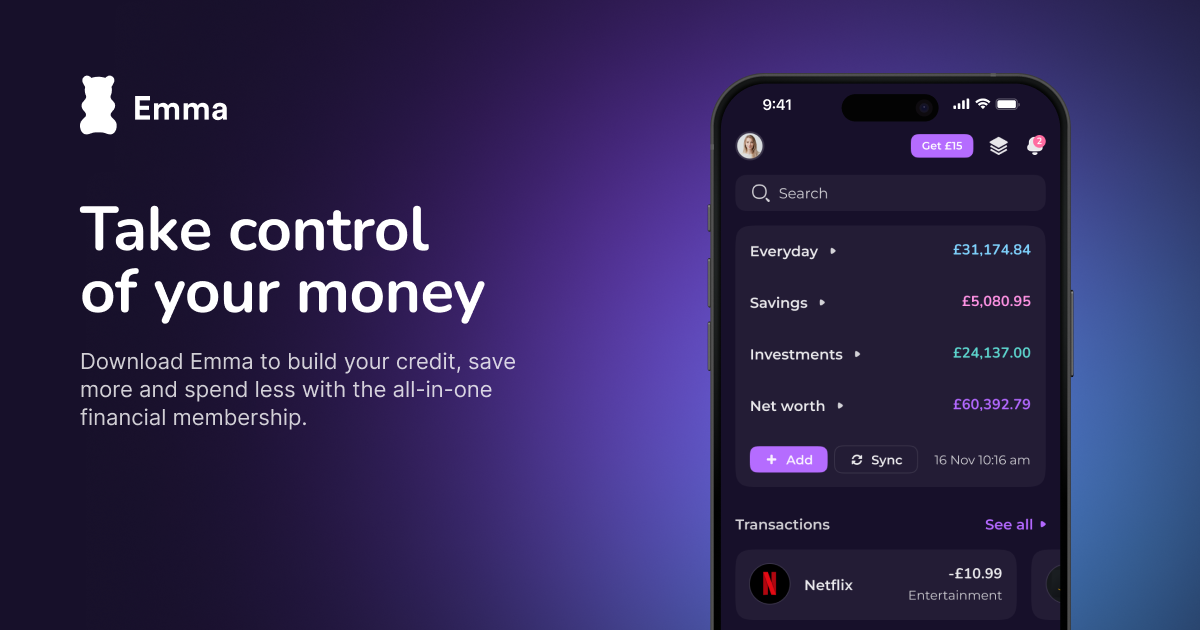
Emma is a budgeting and account aggregation app, available on iOS and Android and used across Europe, France included. It stands out for automatically tracking subscriptions and recurring direct debits, which helps spot forgotten spending and cut your costs.
Why it is a good app:
- Account aggregation: Emma brings your bank accounts, cards and investments together in one interface so you can see all your finances.
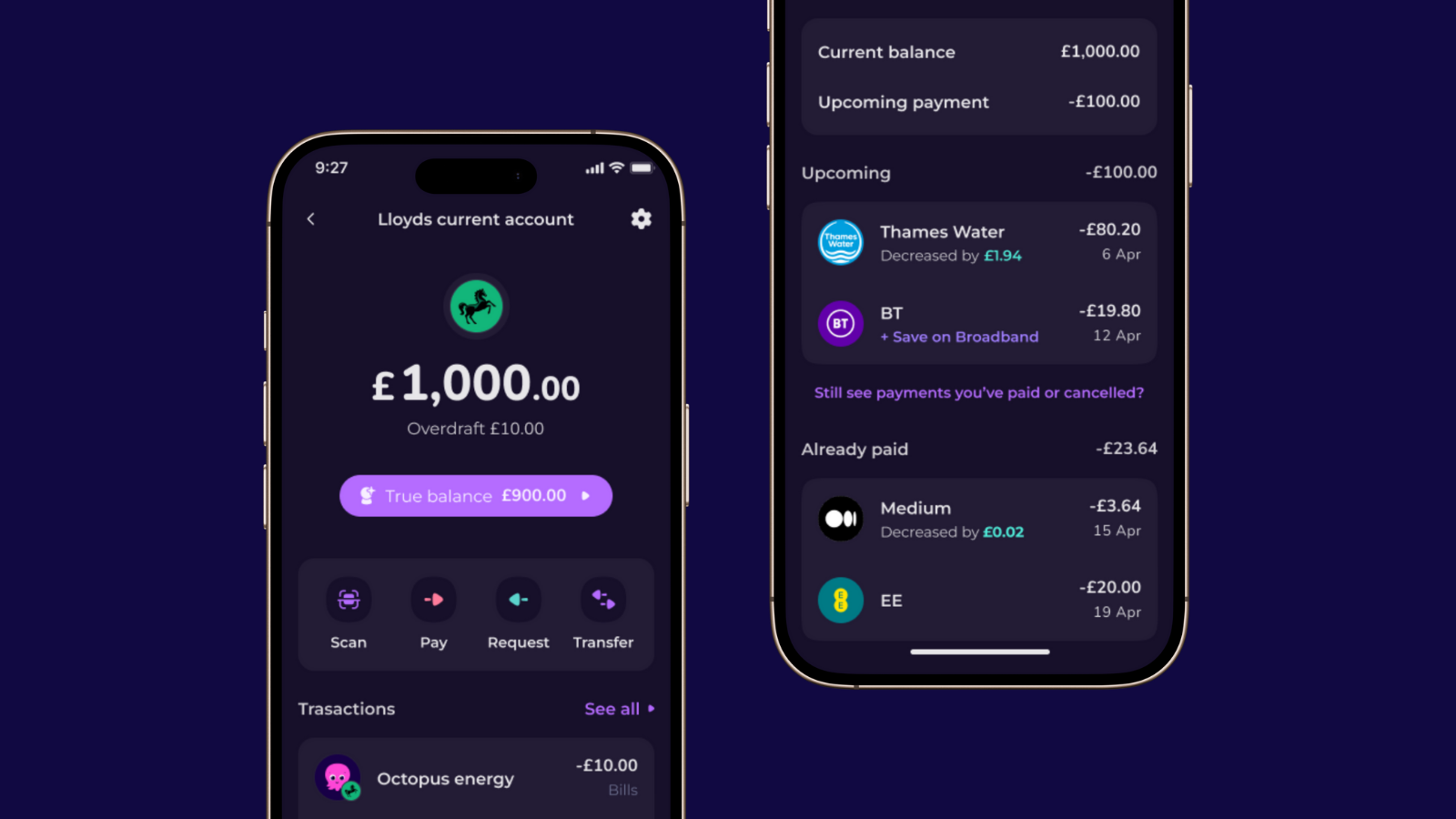
- Subscription tracking: the app automatically spots your recurring subscriptions and alerts you, which helps cancel unnecessary spending.
- Custom budgets and categories: you create budgets by category, rename your transactions and set automatic rules.
- Security and reminders: Emma flags suspicious transactions and reminds you of upcoming bill due dates.
Why you should think twice:
- Advanced features are paid: custom categorisation, data export and dedicated Spaces require a subscription.
- Bank coverage to check: depending on your French bank, syncing may be more or less complete.
- Interface mainly in English: the app and its support remain primarily English-speaking.
How much does it cost?
Emma offers a free tier and three subscriptions:
- Emma Plus: £4.99 per month or £41.99 per year.
- Emma Pro: £9.99 per month or £83.99 per year.
- Emma Ultimate: £14.99 per month or £124.99 per year.
| Emma | App Store | Play Store |
|---|---|---|
| Rating | 4.7 | 2.8 |
| Download link | Download on the App Store | Get it on Google Play |
Spendee: a very complete budgeting suite
Spendee stands out for offering complete personal finance tracking. Users can easily record and track their spending and income, with detailed assignment to various categories. That allows granular analysis of where the money goes. With features such as creating budgets and setting reminders, you keep constant control of your finances.
Why it is a good app:
- Expense and income tracking: Spendee lets users easily record their spending and income, giving a clear overall view of their personal finances.
- Automatic categorisation: the app categorises transactions automatically, which helps you understand where the money goes.
- Customisable budgets: users can set budgets for different spending categories, making it easier to manage finances and rein in unnecessary spending.
- Reports and analysis: Spendee offers detailed reports and analysis that help identify spending trends and make informed decisions.
- Bank account syncing: the app lets you sync bank accounts for automatic transaction updates.

Why you should think twice:
- Subscription cost: Spendee offers premium features that require a paid subscription, which can put some users off.
- Complexity for beginners: although the interface is intuitive, users less familiar with financial apps might find Spendee a little complex at first.
- Free tier limits: Spendee's free version is limited in features, which pushes you towards a subscription for the full experience.
How much does it cost?
Subscription plans: Spendee offers several plans, including a free tier with basic features, and paid tiers (Spendee Plus and Spendee Premium) with extended features such as syncing several bank accounts, creating multiple budgets, and advanced reports. Prices vary according to the length of the subscription and the features chosen.
| Spendee | App Store | Play Store |
|---|---|---|
| Rating | 4.6 | 4.2 |
| Download link | Download on the App Store | Get it on Google Play |
Fudget: advanced visualisation of your budget and finances
Fudget is a budget planning app that stands out for its simplicity and its back-to-basics approach to managing money. It lets you create and manage monthly budgets without automatically tracking spending or importing accounts.
Why it is a good app:
One notable feature is its advanced graphical visualisation. Fudget shows your financial health through intuitive, engaging charts, making financial analysis not only simpler but also more enjoyable.
Beyond the basics, Fudget offers extended capabilities:
- Managing separate wallets for specific events (parties, trips and so on).
- Multi-currency support, handy when travelling abroad.
- Cryptocurrency account integration, meeting the needs of modern users.
- The option to create shared accounts, for managing money jointly with others.

Why you should think twice:
- Lack of advanced features: unlike other budgeting apps, Fudget offers no automatic expense tracking, nor options such as credit or loan monitoring.
- Too simple for some: for those after more advanced features such as charts or core accounting functions, Fudget can feel too rudimentary.
- Ads: the free version contains ads that some users may find distracting.
While these extra options come at a modest cost, they show how complete the app is and how flexibly it adapts to various budgeting scenarios.
How much does it cost?
Fudget offers a free tier and two Fudget Plus subscriptions:
- Fudget Basic (free): up to 5 budgets, 250 entries and syncing on 1 device.
- Fudget Plus annual: €17.51 per year, with a 7-day free trial.
- Fudget Plus six-month: €13.13 for 6 months, with a 7-day free trial.
The Plus plans unlock unlimited budgets and entries, real-time multi-device syncing, account sharing with someone close to you and extra tools (folders, calculator, export, print, sorting, reminders).
| Fudget | App Store | Play Store |
|---|---|---|
| Rating | 4.5 | 4.1 |
| Download link | Download on the App Store | Get it on Google Play |

How have budgeting apps evolved?
From pen and paper to digital apps, budgeting has changed considerably.
How technology has simplified budgeting
Technology has made budgeting more accessible and effective. Modern apps offer features that were once unthinkable, such as real-time expense tracking, analysis of spending habits, and financial forecasting.
Budgeting apps: what are they for?
Budgeting apps act as decision-support tools: they centralise financial data, automate expense tracking and alert you when a budget drifts.
Their role in personal financial planning
Budgeting apps help you take control of your personal finances, giving a clear picture of your situation for effective planning.
Benefits of budgeting apps
- Real-time tracking: lets you see where money is being spent as soon as a transaction goes through, helping you stay within budget.
- Expense categorisation: sorts spending into categories, helping identify your biggest outgoings and where you could save.
- Financial forecasting: analyses spending trends to predict future habits and help plan for significant financial events.
Finary's budgeting resources
Finary lets you track all your cash flows: your bank accounts are aggregated automatically, your spending categorised with AI and your savings rate calculated in real time. You also see your net worth, your debts and how your spending breaks down under the 50/30/20 method.
We also offer free resources to go further:
- our guide to managing your budget step by step;
- a budget calculator to estimate how to split your monthly income.
Frequently asked questions
When it comes to managing a personal budget, certain methods and tools have proved their worth in tracking and improving your finances. The questions below give clear answers on specific budgeting topics.
What is the 50/30/20 rule?
The 50/30/20 rule is a budgeting method that suggests splitting net income into three spending categories: 50% for needs, 30% for wants and 20% for savings or paying down debt. This approach helps maintain financial balance by allocating available resources sensibly.
How do you keep an eye on your budget?
To monitor your budget, it is worth using tools and apps that track spending in real time. These apps can offer visualisations and alerts to help you stay within preset budgets and avoid overspending.
Are budgeting apps secure?
Most reputable apps encrypt banking data and have read-only access to accounts through authorised banking connectors. Check that the app displays a security certification (encryption, two-factor authentication) before syncing your accounts.
Do you have to pay for a budgeting app?
No, most apps such as Finary, Tricount or Linxo offer a free tier that is sufficient for basic use. A paid subscription becomes useful for unlimited syncing, advanced automatic categorisation or managing multiple business accounts.
Which app should you choose for budgeting as a family or between friends?
For family use, Wallet and Emma offer account sharing between several users. For one-off expenses between friends (a trip, a flat share), Tricount remains the free benchmark thanks to its simple handling of reimbursements and its multi-currency support.
Sources
Money Manager (RealByte), app overview
Regulatory disclaimers: Marketing communication. Investing carries a risk of partial or total capital loss. Past performance is not a reliable indicator of future performance. This article is provided for information and educational purposes only; it does not constitute personalised investment advice, a buy or sell recommendation, or tax advice. Before investing, read the Key Information Document (KID) and, where relevant, consult an authorised adviser. Finary SAS, an investment firm authorised by the ACPR under no. 19283, member of AMAFI. Insurance broker registered with ORIAS under no. 21001279, member of the CNCGP (association approved by the AMF). Crypto-Asset Service Provider (CASP) authorised by the AMF under the MiCA regime, references no. A2026-026 and no. N2026-008.